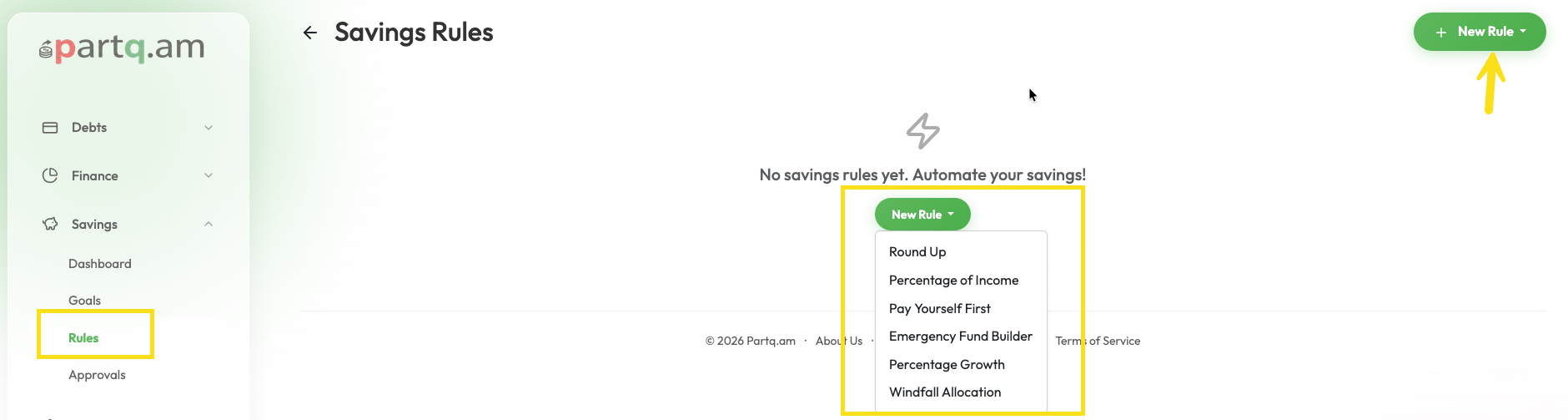
Saving rules help you save money effortlessly by automating the process.
Available Rule Types:
- Round Up: Rounds up every expense transaction to the nearest integer and saves the difference.
- Percentage of Income: Automatically saves a percentage of every income transaction.
- Pay Yourself First: Automatically sets aside a fixed amount or percentage from every income transaction.
- Emergency Fund Builder: Prioritizes building liquid savings equal to X months of your average expenses.
- Percentage Growth: Saves a percentage that increases over time (e.g., starts at 10%, increases by 1% every quarter).
- Windfall Allocation: Allocates a percentage of unexpected large income supplements to savings.
How to create a rule:
- Go to the Savings dashboard.
- Click on New Rule (or the + icon).
- Choose the Rule Type you want to enable.
- Configure the parameters (e.g., percentage, amount, source/destination account).
- Link it to a Savings Goal if desired.
- Click Save Rule.
You can pause or delete rules at any time.